

Downloaded an Instagram video that looks softer, blurrier, or more compressed than expected? In many cases, the problem is not the act of downloading itself.
The short answer is this: a downloader can only save the best version Instagram makes available. It cannot restore visual detail that was already reduced during upload, platform processing, or earlier re-encoding.
Why can a downloaded Instagram video look blurry?
A blurry-looking download can come from several different causes:
- the creator's source file was already limited;
- Instagram compressed or optimized the file for delivery;
- the available version is not the same as the creator-original file;
- a 1080p label created false expectations;
- the file is being judged in a browser preview instead of a better player.
The key is to separate source quality, Instagram processing, and downloaded-file quality.
Instagram processes uploaded videos before they are served
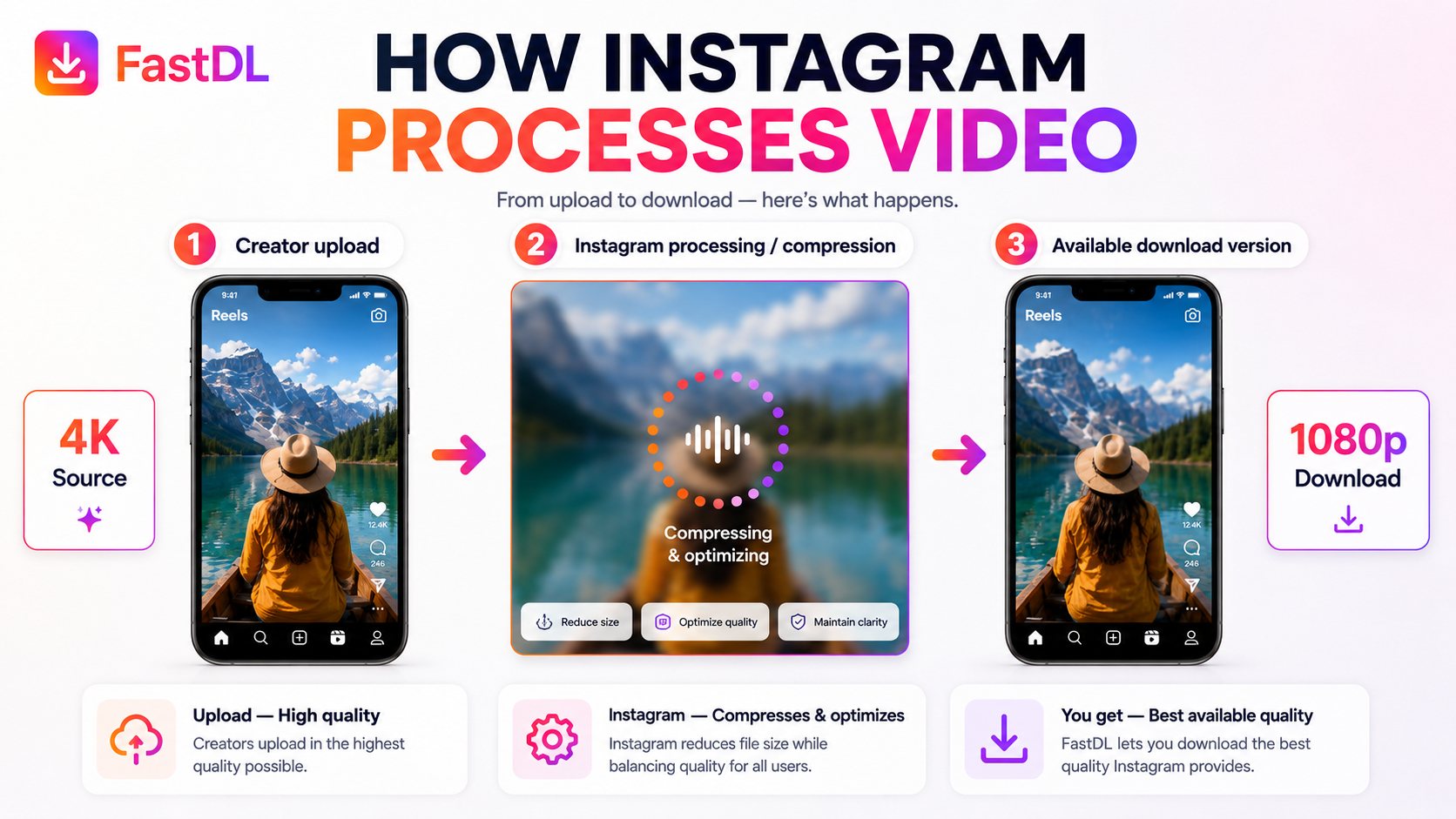
Instagram does not always expose the creator's untouched source file. Instead, uploaded video may be processed for delivery, compatibility, and playback across different devices and network conditions.
That means when you save a post using an Instagram video downloader, the file you receive reflects the version Instagram encoded for web delivery rather than the creator's raw camera export.
A practical model is:
- Creator upload – the original source starts at a certain quality level.
- Instagram processing / compression – Instagram may optimize the file.
- Available download version – this is the version a downloader may be able to access.
This is why “downloaded file” should not automatically be treated as “original file.”
1080p does not always mean the video will look sharp
One of the most common misunderstandings is assuming that a 1080p label automatically means excellent visual quality.
Resolution only tells you the frame dimensions. It does not tell you how much detail survived compression or how strong the source file was.
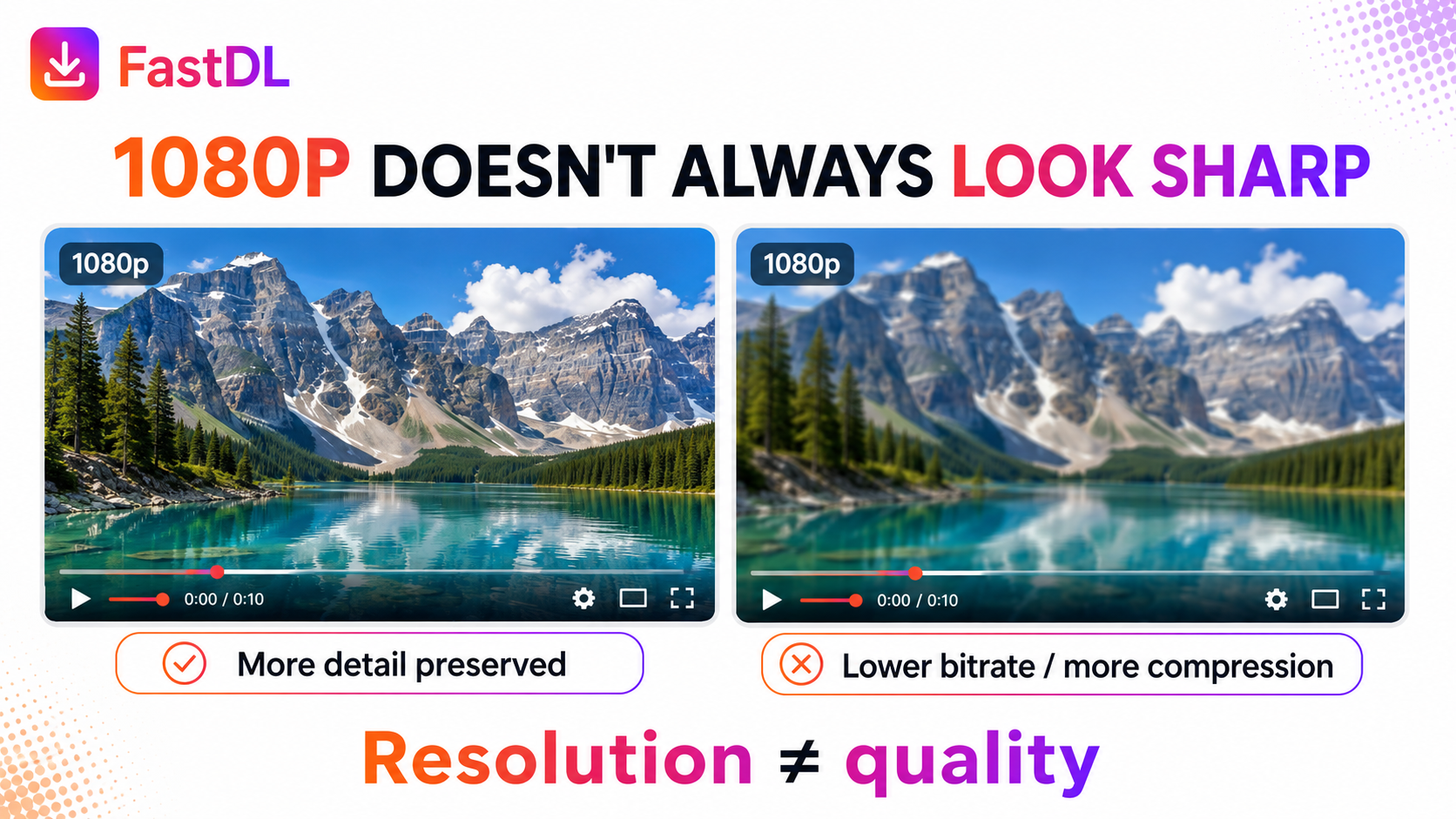
For example:
- one 1080p file may preserve much more texture and detail;
- another 1080p file may look soft because of lower bitrate or stronger compression.
That is why resolution ≠ quality.
Compression can remove visible detail
Video compression reduces the amount of data needed to store or deliver a file. That is useful for speed and compatibility, but it can also reduce visible detail.
Compression artifacts often show up in:
- hair and skin detail;
- text and edges;
- tree leaves, grass, and water;
- gradients in skies or shadows;
- fast movement.
A video that looks acceptable inside an app at a smaller size can look much softer when opened larger on a laptop or desktop display.
The creator's source may already be weaker than expected
Sometimes the loss starts before Instagram.
A creator may upload:
- a low-light recording;
- an already-compressed export;
- a screen-recorded version;
- a reposted clip that has passed through multiple lossy exports.
In those cases, the platform starts with a weaker source file, and no downloader can recreate the missing original detail.
This is also why “original quality” should be used carefully in product copy. In most cases, the more accurate promise is best available quality from Instagram.
Does downloading itself reduce quality?
Not necessarily.
If a downloader simply saves the available file without adding another heavy conversion step, downloading does not automatically make a video blurrier. The file is just being copied to your device.
Quality issues usually come from the source, the platform's processing, or extra re-encoding — not from clicking a Download button.
Check the file, not just the label
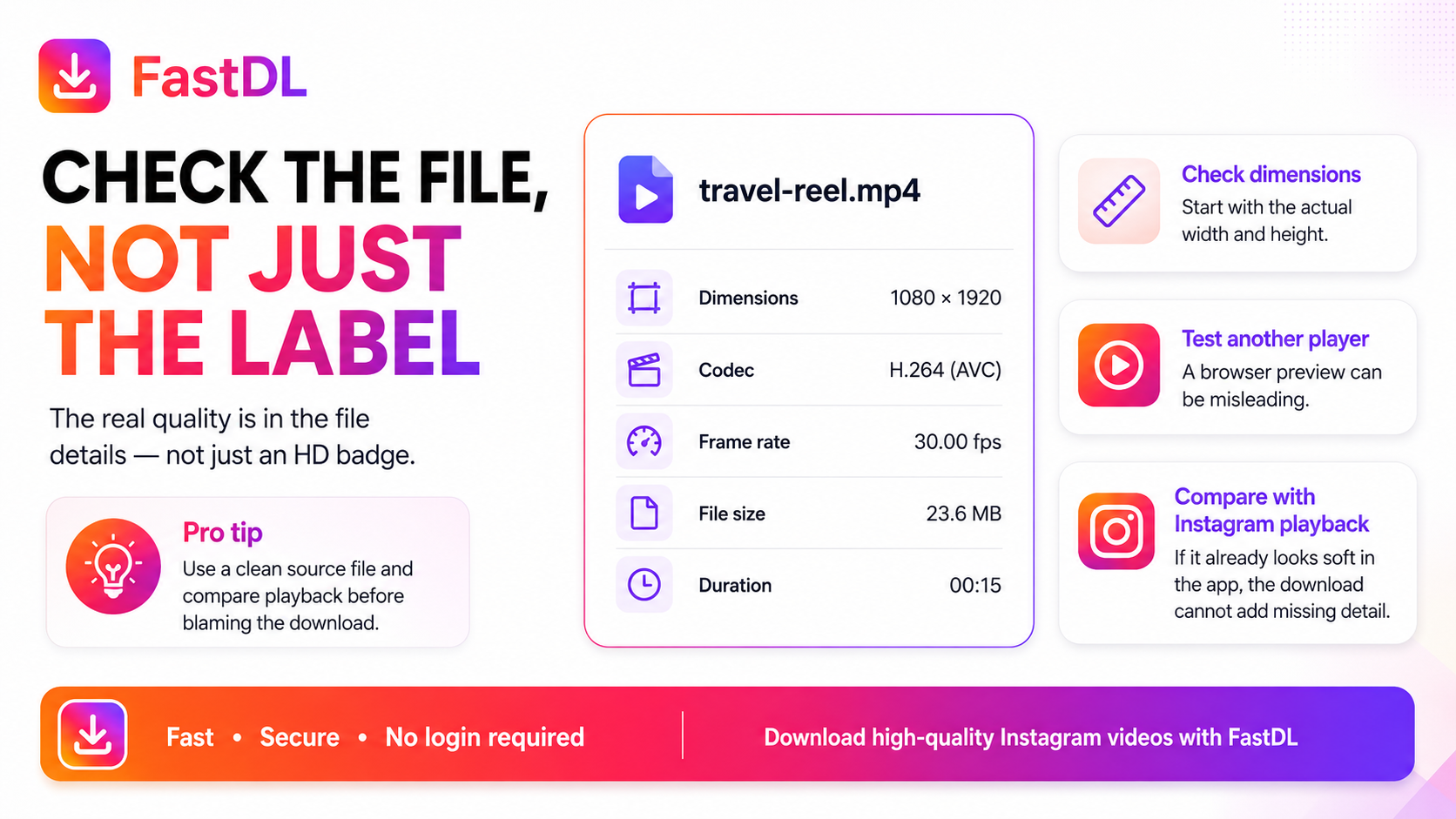
Do not judge quality from an “HD” or “1080p” badge alone. Inspect the actual file.
A useful quality check includes:
1. Check the dimensions
Vertical Reels are commonly shown at 1080 × 1920 (9:16). If you frequently save short-form content with an Instagram Reels downloader, verifying that the saved file matches these pixel dimensions confirms you received the full resolution stream.
2. Check the codec
A common, widely compatible video codec is H.264 / AVC. Codec alone does not guarantee quality, but it helps confirm you are dealing with a normal playback-friendly file.
3. Check the frame rate
A rate such as 30 fps is common. Frame rate does not directly control sharpness, but it affects how smooth motion looks.
4. Check the file size in context
A file that is unusually small for its length and dimensions may point to stronger compression.
5. Test another player
Browser previews can be misleading. If a file looks suspicious, test it in another player before concluding that the saved file is bad.
6. Compare with Instagram playback
If the video already looks soft in Instagram itself, the downloaded copy is unlikely to contain more detail than the platform is showing.
Can every Instagram video be downloaded in 1080p or higher?
No.
The final available quality depends on:
- the creator's source file;
- earlier exports or reposting;
- Instagram's processing choices;
- the specific version exposed for playback or download.
If a higher-quality version is not actually available, no honest downloader can truly restore it.
Can blurry video be fixed?
Only to a limited degree.
You may improve playback perception by:
- using a better media player;
- viewing the file at a more natural size;
- starting from the highest-quality available version;
- avoiding repeated lossy re-exports during editing.
AI enhancement can sometimes make a video appear cleaner, but it does not restore the exact creator-original data.
Frequently asked questions
Why can a video look clear in Instagram but blurry after download?
Instagram may display the video at a smaller size, and compression artifacts can become more obvious when the downloaded file is viewed larger on another screen.
Is 1080p always high quality?
No. Resolution only describes frame size. A 1080p file can still look soft if the source was weak or compression was heavy.
Does downloading reduce video quality?
Downloading does not automatically reduce quality. Quality issues usually come from the source, Instagram's processing, extra re-encoding, or playback conditions.
Can FastDL recover the creator's original file?
FastDL can save the best version Instagram makes available, but it cannot reconstruct detail that the platform does not expose.
What should I check first if a downloaded file looks blurry?
Start by checking the file dimensions, testing another player, and comparing the file with Instagram playback.
Final takeaway
A blurry Instagram download does not automatically mean the downloader did something wrong. In many cases, the real reason is compression, limited source quality, unrealistic expectations around 1080p, or confusion between the creator's original file and the version Instagram actually makes available.
The safest and most accurate approach is simple: save the best available version without pretending to recreate detail that is no longer there.